AnyRetail Data
AnyRetail Snacks is a fictitious consumer packaged goods (CPG) company that manufactures healthy, plant-based snack products including five product lines: Grainfuls, Green Crunch, RealFuel Bars, Veggie Pops, and Berry Bites. The company focuses on health-conscious innovation with vegan, gluten-free, high-protein snacks that compete in the $32.88 billion healthy snack market.
In this exercise, you'll use the AnyRetail Snacks Space to explore how Quick Suite can help you analyze complex business data and make informed decisions.
Files in the AnyRetail Snacks Space
- Sales & Customer Intelligence - Regional quotas, CRM transactions, incentive strategies, customer reviews, complaints, and satisfaction ratings
- Product & Marketing Strategy - Nutritional facts, allergens, dietary specifications, brand guidelines, presentations, and demographic analysis
- Market Research & Analysis - Snack market trend forecasts through 2030, competitive analysis, and market opportunities
- Partnership Programs - Retail partner meeting recordings covering training, incentive programs, and launch strategies
AnyRetail Snacks Space

Note: this screenshot is just for reference so you can see what files are in the AnyRetail Snacks Space. You do NOT need to go to this page.
Step 1: Connect to the AnyRetail Snacks Space
-
Click New conversation button
 to start a fresh conversation
 -
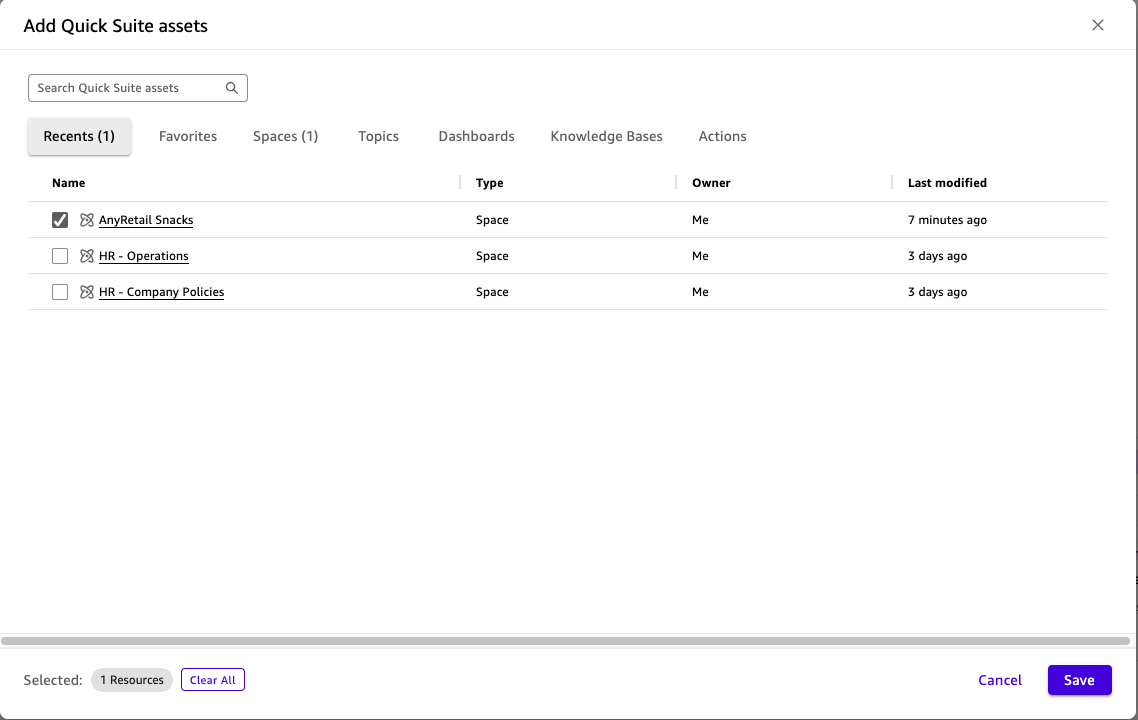
Click on All Data and Apps

-
Click on on + Add

-
Put a check mark next to AnyRetail Snacks then click Save
-
Double check that your space now shows AnyRetail Snacks
 and that web search is disabled.
Step 2: Explore What You Can Do With This Space
Before diving into specific questions, it's helpful to understand what's possible with your data.
-
Ask the question:
Quick Suite will analyze all the files in the AnyRetail Snacks space and provide suggestions for how you can use the data, such as:
- Asking questions about customer feedback and complaints
- Analyzing sales performance and trends
- Reviewing nutritional information and product details
- Understanding brand messaging and market positioning
- Exploring market forecasts and competitive analysis

Step 3: Ask Business Questions Using the Space
Now let's ask some specific questions to see how Quick Suite can help analyze your business data.
-
Ask about customer complaints:
You should get a detailed answer showing the three main complaint categories with specific case counts and priority levels, synthesized from multiple files in the space.
Note: this query might take longer than some of the others as it has a lot of number crunching to do.

-
Ask about sales trends:
You should get an answer covering top-performing products, sales representative performance, seasonal patterns, and market projections.
You can see that Quick Suite makes it very easy to work with complex business data across multiple file formats (PDF, DOCX, CSV, PPTX, MP4, M4A).
Step 4: Create a Partner Meeting Document
Now let's see how Quick Suite can help with a real business scenario - preparing for a partner meeting in Japan.
Scenario: You're an AnyRetail Snacks business development manager preparing for a meeting with a Japanese grocery store chain. You need to create a compelling document to encourage them to run sales campaigns for Veggie Pops.
-
Ask the question:
-
Watch Quick Suite work its magic
As Quick Suite processes your request, you'll see it actively searching through multiple files in real-time, pulling information about Veggie Pops, Japan market opportunities, customer data, sales quotas, partnership programs, and Asia-Pacific market metrics.
-
Review the comprehensive response
Quick Suite synthesizes information from multiple sources to create a complete partner meeting document with executive summary, product overview, market data, customer validation, and financial projections - all in seconds instead of hours.
-
When you're done reviewing the text, if it popped up in a separate window, you can close it by clocking on the X button.

Key Takeaways
With Quick Suite Spaces, you can:
- Get comprehensive answers that synthesize information across multiple documents and file formats
- Share knowledge across teams with role-based access controls
- Click Next to move onto the next section where we'll learn more about Agentic AI.